CinemaTruck is a free tool for making cinematic camera flights and videos in Euro Truck Simulator 2. Drive a route once, then film it from any angle you like. One drive, endless camera angles.
KEY FEATURES
– Records your drive together with the surrounding traffic (it uses the game’s own replay system), with pause and resume.
– Replay with pause, seeking and speed from 0.5x to 4x. The steering wheel turns in the replay.
– Free camera: fly with WASD, look around with the right mouse button, change speed with the mouse wheel.
– Orbit camera around your truck.
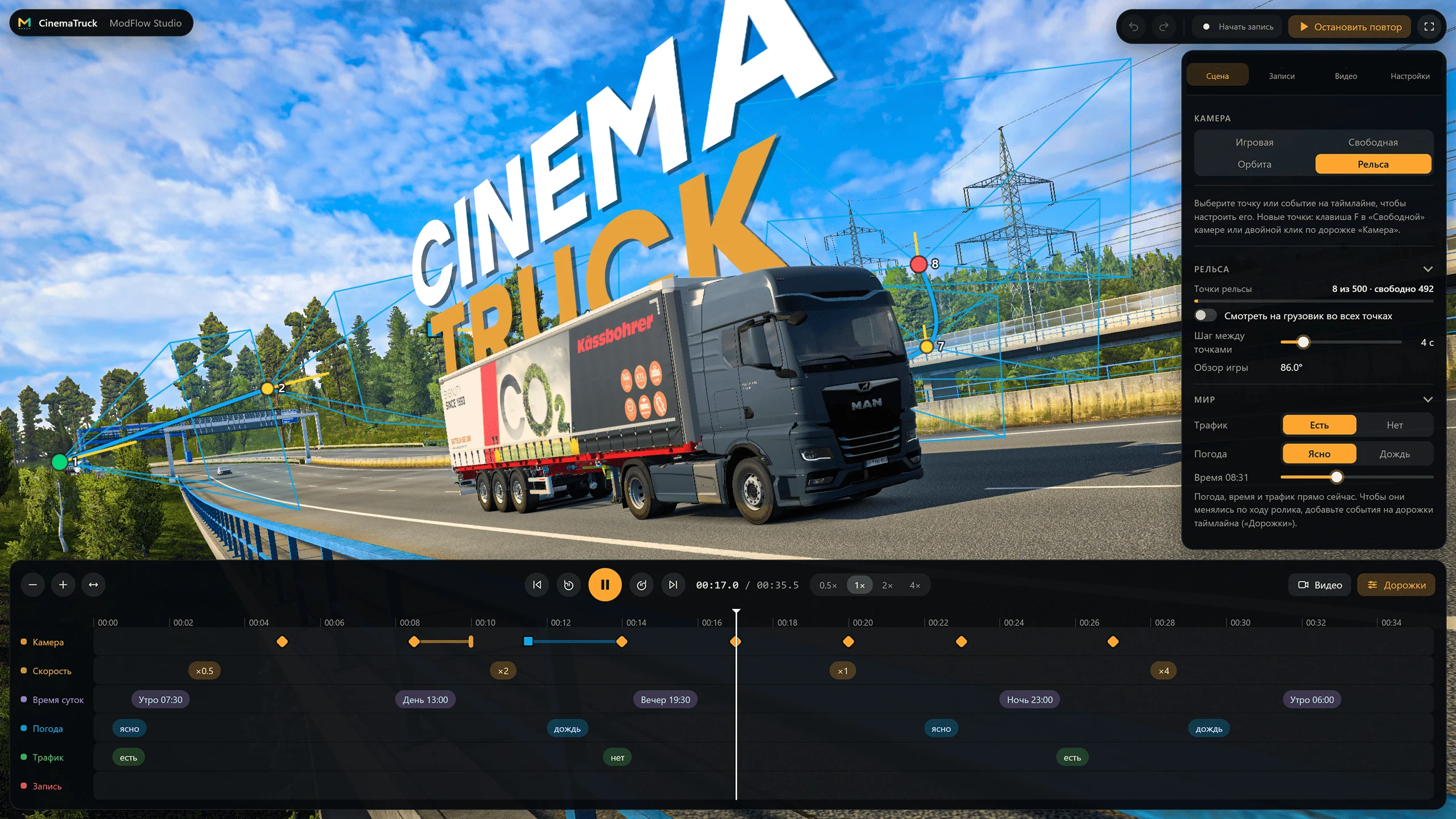
– Rail camera: place smooth-flight points and static shots, and the camera flies through them in sync with the replay. Up to 500 points.
– Per-point settings: roll, field of view, focus blur (depth of field), look at the truck, segment speed and hold time.
– Full-screen editor with a timeline: move points, select them in groups, undo and redo.
– Timeline events: weather, time of day and replay speed change during the clip.
– Video rendering at a steady frame rate (24, 30 or 60 fps) without the game interface, H.264 or H.265, with the game’s sound (optional).
– Russian and English interface, UI scale 100-150%, tray icon, starts together with the game.
– Switches itself off in TruckersMP.
SUPPORTED GAME VERSION
Euro Truck Simulator 2 from Steam, tested on 1.62. Single player only. American Truck Simulator is not supported. After a game patch the plugin finds the game functions by signatures; whatever it cannot find is switched off instead of crashing the game.
REQUIREMENTS
Windows 10 or 11, 64-bit. H.265 video may need the Microsoft HEVC extension; H.264 works without it.
INSTALLATION
1. Close the game.
2. Run CinemaTruck-Setup-0.9.0.exe. The installer finds Euro Truck Simulator 2 in Steam and puts one plugin file into the plugins folder. Game files are not changed. Administrator rights are usually not needed.
3. Start the game. On every start the game shows a window about advanced SDK features: press OK.
4. A “CinemaTruck is running” message appears in the corner. Ctrl+Alt+E opens the panel, Ctrl+Alt+R opens the editor.
5. Record: Ctrl+Alt+E, “Start recording”, drive, stop with the parking brake and press “Stop recording”. Replay: Ctrl+Alt+R, “Recordings” tab, pick a recording, “Start replay”. Then use cameras, rail points and the “Video” tab.
Recordings are stored in DocumentsEuro Truck Simulator 2saved_replays, videos in VideosCinemaTruck, camera points and settings in DocumentsCinemaTruck. Uninstall from Windows “Apps”: the plugin is removed from the game, your recordings and videos stay.
NOTES
– The installer is not digitally signed yet, so Windows SmartScreen or an antivirus may show a warning. Press “More info” and “Run anyway”. The plugin works inside the game process, which is why protection can be cautious. The SHA-256 checksum is shown on the download page.
– The program does not connect to the internet and does not collect any data.
– A recorded traffic cannot be removed from a replay: it is replayed from the recording.
– Version 0.9.0 is a beta. If something does not work, press “Collect diagnostics” in the editor settings (or in the tray icon menu) and send us the archive.
CHANGELOG
0.9.0 – first public version (beta): recording and replay with traffic, free / orbit / rail cameras, timeline editor, video rendering with sound, Russian and English interface.
Credits:
ModFlow Studio
DOWNLOAD 2.3 MB [Mirror]