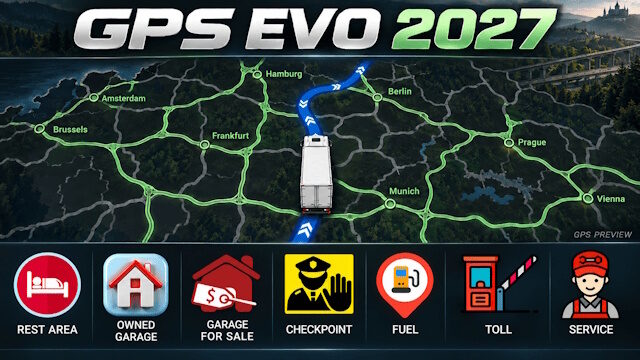
GPS EVO 2027
Give your Euro Truck Simulator 2 GPS and map a fresh look with dark blue navigation, light green explored roads and clear white direction arrows.
Features:
• Dark blue GPS route with white direction arrows.
• Light green explored roads and areas.
• Custom 60 × 60 icon textures, preserving their proportions.
• New red rest-area icon.
• A white truck replaces the player position arrow.
• Custom icons for garages
• New English presentation cover.
• Discovered city names remain green.
Your saved exploration progress remains unchanged.
COMPATIBILITY:
The standard edition is designed for the official ETS2 1.61.x map and its DLCs.
ProMods, RusMap and custom map backgrounds require a matching compatibility patch, or the separate Modular Maps edition with a supported modular background.
Do not enable both editions together.
Compatibility with specific ProMods/RusMap versions has not yet been verified.
Displayed icon size depends on map zoom and interface scaling.
Credits:
Erik1520



@Adam
First Open the Rar File inside has 2 folders 1.informational 2.content_161
open the content_161 folder and extrack the contents on the desktop
now right click and creat new Zip archive and put all the files from the content_161 to the zip archive that you created and name it GPS EVO 2027
E COLOCA A PASTA ONDE?
It doesn’t work on the latest version.