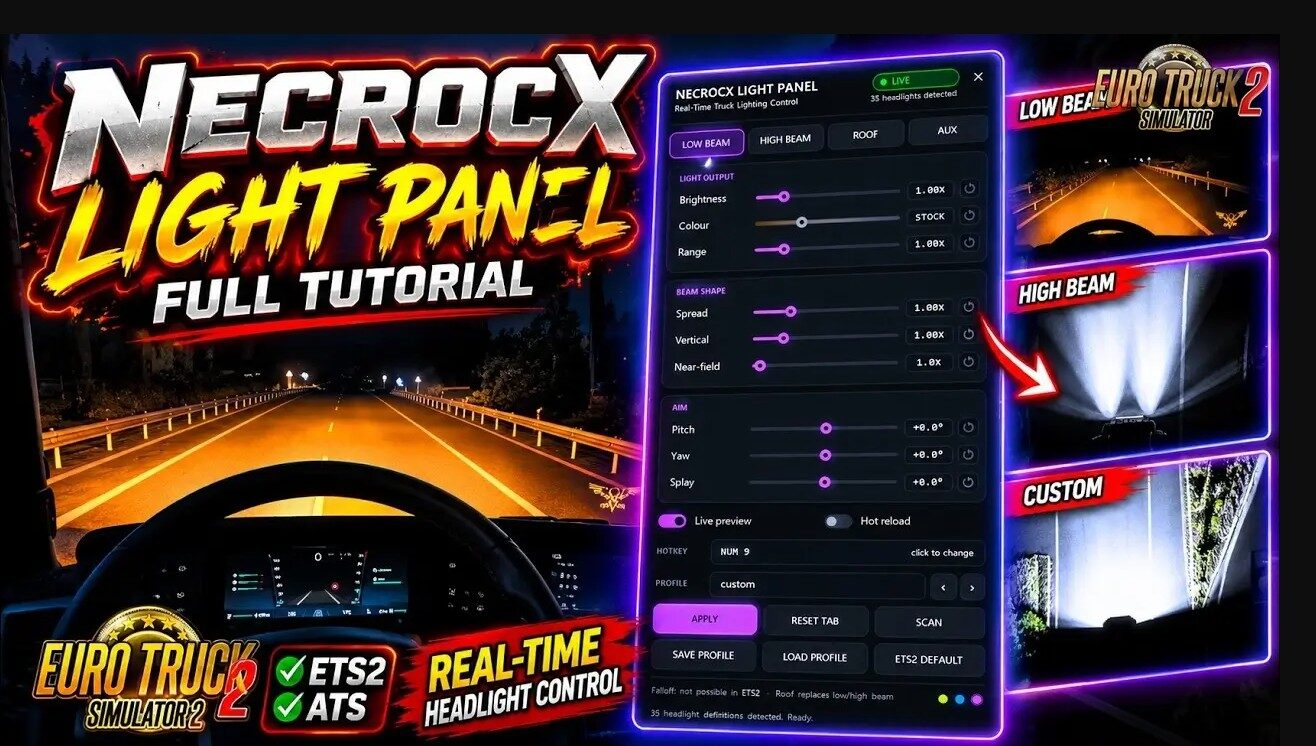
This is a free ingame plugin that lets you tune your truck’s real road lights while driving. Change low beam, high beam, roof bar and front auxiliary lights independently and see the results immediately on the road.
New in v1.5: full compatibility with headlight/lighting mods and improved ATS support.
Features:
– Live tuning of Low Beam, High Beam, Roof and Front Aux lights
– Nine controls per light group:
– Brightness (0.05–5.00x)
– Colour temperature (1700–12000 K)
– Range, Spread, Vertical, Near-field
– Pitch, Yaw and Splay
– Profiles system (save and load your setups)
– Customizable hotkey (default: Shift + Insert)
– “My truck only” mode (especially useful in TruckersMP)
– Works with headlight and lighting mods
– No DirectX overlay – fully compatible with ReShade, DLSS, etc.
– Compatible with ETS2 and ATS
Changes in v1.5:
– Now works with headlight & lighting mods
– Fixed ATS issues when certain trucks drive by
– More reliable “Find my truck” function
– Clearer status messages
– Better logging for easier troubleshooting
Installation:
1. Close the game
2. Run Install.bat (choose ETS2, ATS or both)
3. Start the game and accept the SDK plugins notice
4. Sit in your truck → press Shift + Insert → press FIND MY TRUCK
Tested on game version 1.61.x
Credits:
NecroCX Mods
![PhotoGrapfix – Nvidia Presets ETS2 [1.60-1.61.1.3][1.53-1.59]](https://ets2.lt/wp-content/uploads/2026/10/PhotoGrapfix-–-Nvidia-Presets-ETS2-1.60-1.61.1.31.53-1.59-1-1-750x422.jpg)