
– Colors, the picture becomes more realistic. I registered in the shader (s) “Smaa” a resolution of 1920×1080.
– Improved clarity, smoothing, colors, HDR (lowered the glow), bloom (reduces), granularity. The picture becomes without soap film.
– By default, SMaa is anti-aliasing in the settings, you can put FXaa, if there are brakes or lags, I did not notice this.
– For weak computers, you can try to disable anti-aliasing “Smaa” or change to “Fxaa”.
– Settings are located in the folder “SweetFX SweetFX_Settings.txt, open a text file and in the item” Choose effects “put (0-off, or 1-on), the smoothing should be one, or SMaa or FXaa.
– In the game (on, off) mode on the key F12.
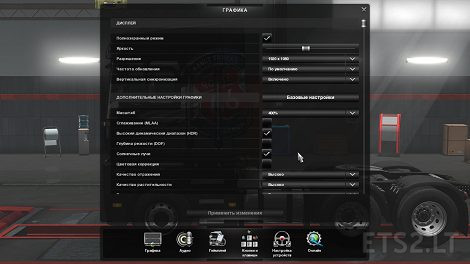
– Settings in the game: HDR-on; Sunbeams-inc; The rest is off, the screenshot shows!
Installation:
– All files from the archive are extracted to the folder with the game Ets2 bin win_x64.
– Delete the mod: all the files that are in the archive, from the win_x64 folder are deleted, and it’s better to make a copy of win_x64 before installation.
Test for 1.30.х-1.31.х
Author: ~ Tok ~
Credits:
~Tok~




Muito bom